
Digital signal processing (DSP) and communication systems are foundational to modern electrical, computer, and telecommunications engineering. Yet for many students and engineers, transitioning from mathematical formulas on a lecture slide—like the Whittaker-Shannon interpolation formula, discrete convolution sums, or rational Z-transforms—to observable physical behavior can feel abstract.
Textbooks present static graphs of aliasing or pole-zero plots, but true intuition develops when you can actively sweep a sampling frequency, tune an IIR filter cutoff, push a pole outside the unit circle, or inject channel noise into a modulated carrier.
To bridge this gap, we built CircuPilot Signal Lab—a zero-install, interactive browser-based visual workbench for Signals & Systems, DSP, and Communications coursework, now available in public beta.
What Can You Explore in an Online DSP Simulator?
A meaningful signal processing laboratory connects core mathematical models with real-time instruments. In CircuPilot Signal Lab, you drag and connect functional blocks on an auto-routed canvas, while dual-channel oscilloscopes, FFT spectrum analyzers, and interactive Z-plane diagrams evaluate the system in real time.
Key areas you can experiment with include:
- Signal Generation & AWGN Noise: Generate continuous-time and discrete-time sequences (sine, cosine, square, sawtooth, sinc pulses) and inject additive white Gaussian noise (AWGN) with adjustable noise standard deviation ($\sigma$).
- Sampling Theory & Nyquist Criterion: Connect an analog generator to an ADC block and explore the Nyquist-Shannon sampling theorem ($f_s > 2f_{max}$). Observe spectral folding and aliasing when undersampling, and inspect discrete sample stem plots in the oscilloscope.
- Quantization & Bit Resolution: Adjust the ADC quantizer from 1 to 10 bits ($2^N$ discrete levels) to visualize uniform quantization noise, dynamic range limits, and waveform clipping.
- DAC Reconstruction: Reconstruct continuous-time signals using Zero-Order Hold (ZOH) or ideal band-limited Whittaker-Shannon Sinc interpolation.
- Digital Filtering (FIR & IIR): Configure 1st through 8th order lowpass, highpass, bandpass, and bandstop Butterworth IIR filters or moving-average FIR filters, immediately observing phase shift, passband attenuation, and frequency spectrum roll-off.
- *LTI Convolution ($y[n] = x[n] h[n]$):** Define arbitrary discrete impulse responses $h[n]$ and observe step-by-step linear time-invariant convolution directly on input sequences.
- Z-Transform & Complex Pole-Zero Stability: Inspect rational transfer functions $H(z) = \frac{B(z)}{A(z)}$ on an interactive complex Z-plane diagram with unit-circle ($|z|=1$) boundary checks. Poles outside the unit circle are dynamically flagged as unstable.
- Analog & Digital Modulation Transceivers: Transmit and demodulate analog AM (DSB-LC envelope and DSB-SC coherent), frequency modulation (FM) and phase modulation (PM) with Hilbert transform phase discriminators, and digital modulation schemes including Binary ASK, BFSK, and BPSK with adjustable carrier frequencies and bit rates.
Hands-On Example: Nyquist Sampling and Aliasing
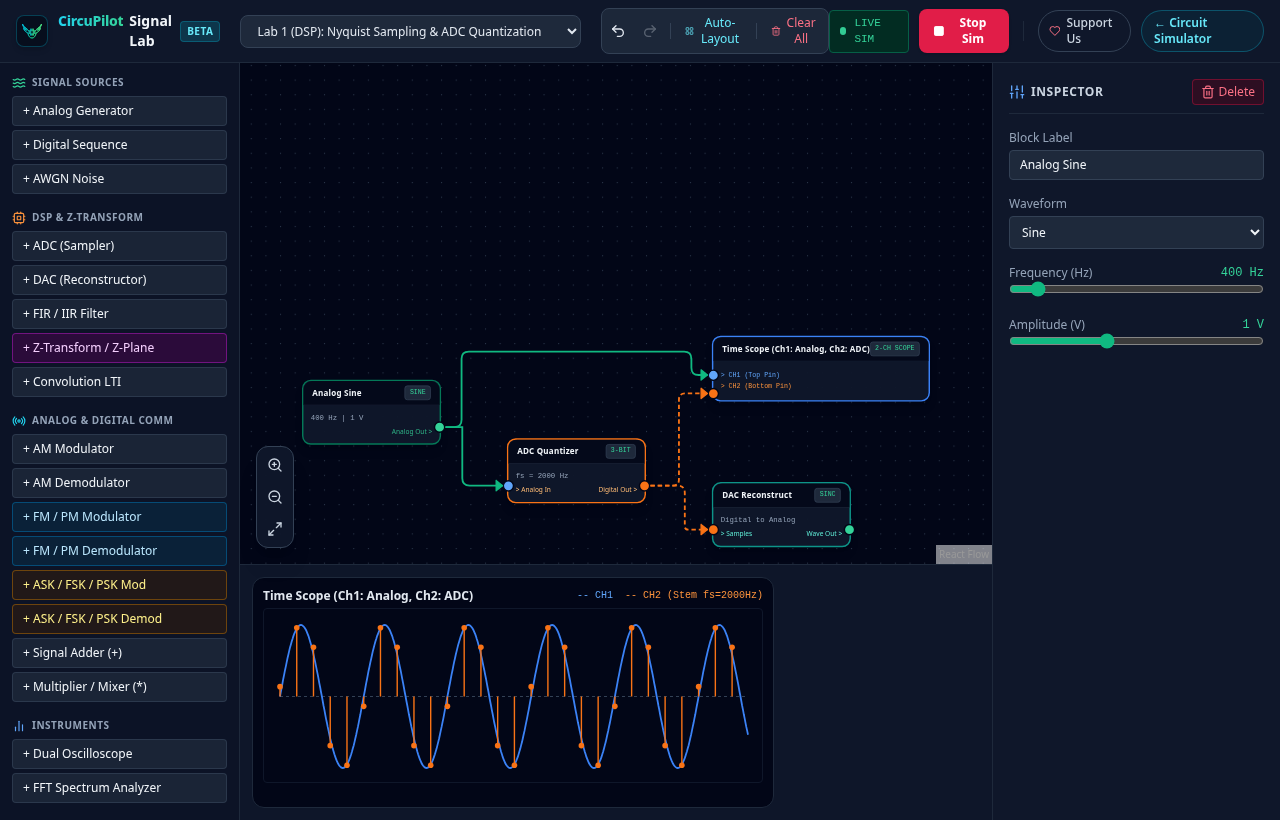
Consider sampling a continuous 400 Hz sinusoidal signal. According to the Nyquist theorem, unambiguous frequency recovery requires a sampling frequency of at least $f_s > 800\text{ Hz}$.
In CircuPilot Signal Lab:
1. Load Lab 1: ADC & Nyquist from the pre-built templates menu.
2. An Analog Generator ($400\text{ Hz}$) feeds an ADC Quantizer configured with $f_s = 2000\text{ Hz}$ and 4-bit resolution.
3. The discrete samples route into a DAC Reconstructor running band-limited Sinc interpolation.
4. The dual-channel oscilloscope displays the original smooth analog waveform in blue alongside the discrete stem points in orange. In the FFT spectrum analyzer, a distinct spike appears at $400\text{ Hz}$.
Now reduce the sampling frequency to $f_s = 600\text{ Hz}$. Because $f_s < 2f_{in}$, the discrete samples no longer retain the original signal's frequency information. The reconstructed waveform visibly drops to a false alias frequency of $|400 - 600| = 200\text{ Hz}$, with the FFT peak shifting directly to $200\text{ Hz}$. Seeing this shift occur instantly as you drag the slider reinforces the mathematical theorem far more vividly than equations alone.
Interactive Z-Plane and System Stability
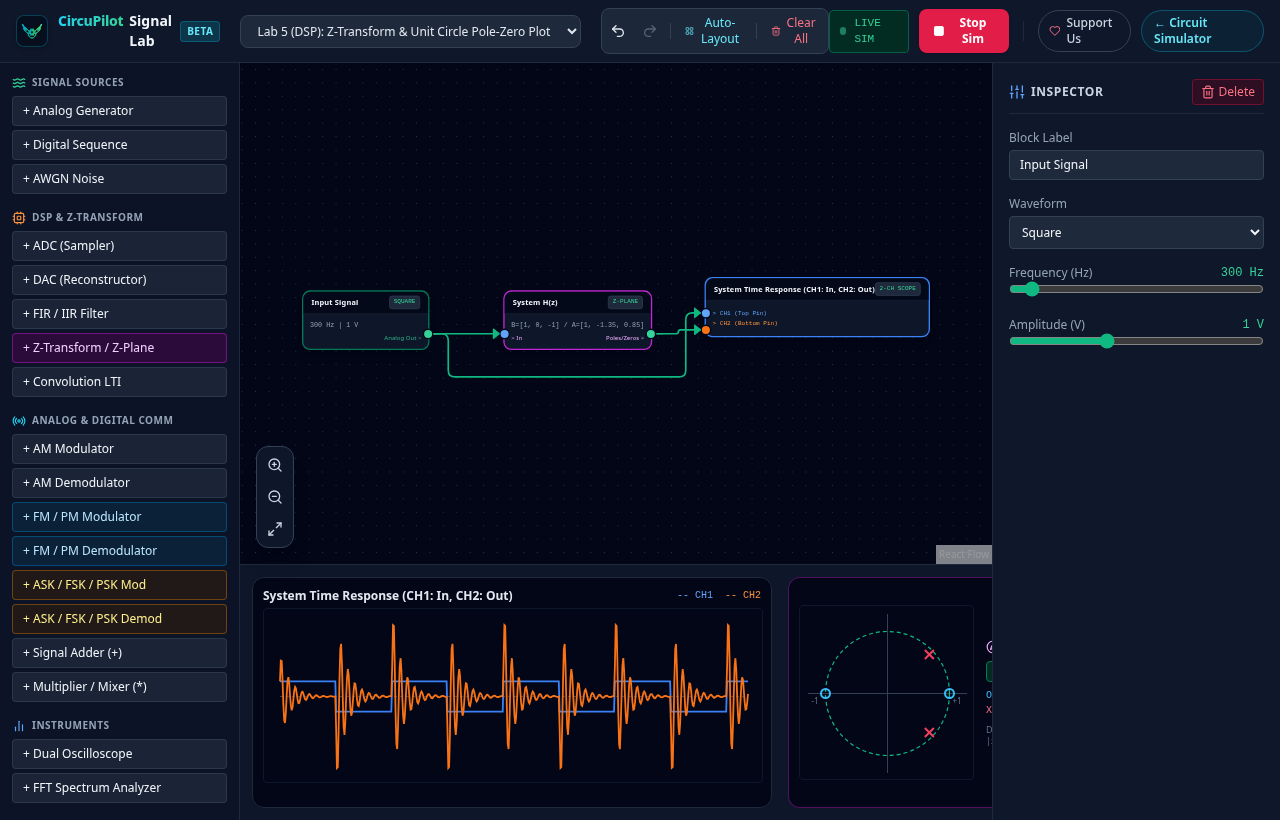
Understanding why an unstable system diverges requires understanding the complex Z-plane. For a causal, rational discrete-time LTI system, Bounded-Input Bounded-Output (BIBO) stability requires all poles of its transfer function $H(z)$ to lie strictly inside the unit circle ($|z| < 1$). If any pole reaches or crosses the unit boundary ($|p| \ge 1$), the impulse response does not decay and the system is BIBO unstable.
With the Z-Transform H(z) block in Signal Lab, you enter numerator and denominator polynomial coefficients (such as $A(z) = 1 - 1.3z^{-1} + 0.81z^{-2}$). The platform automatically factors the polynomials to compute roots:
- Zeros ($O$) are plotted in cyan.
- Poles ($X$) are plotted in rose red.
- The dashed green ring denotes the unit circle $|z| = 1$.
If you edit a feedback coefficient so that $|p|_{max} \ge 1.0$, the Z-Plane display instantly highlights with an active warning badge: UNSTABLE (|p|_max >= 1). You can simultaneously watch the time-domain oscilloscope output oscillate or diverge toward infinity.
Visualizing Digital Communications: ASK, FSK, and BPSK
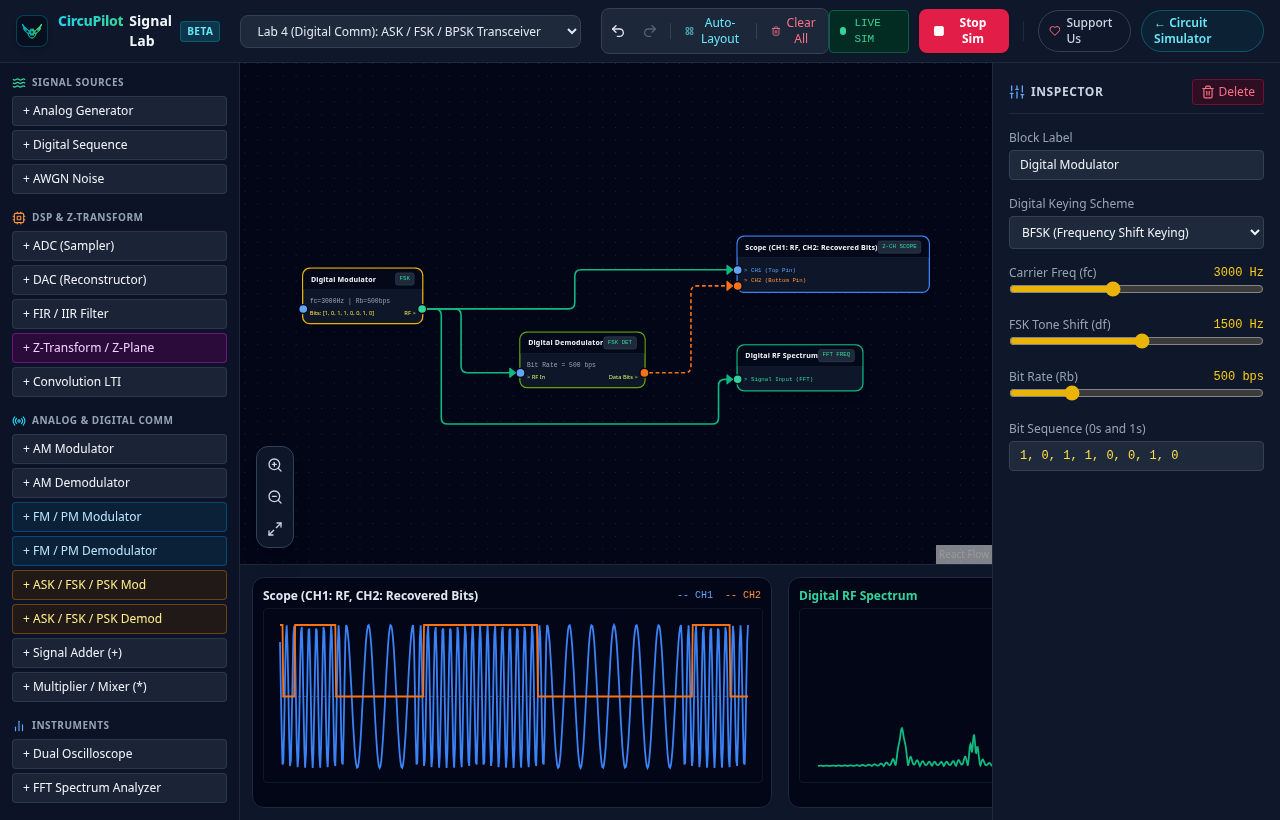
Digital modulation underpins modern wireless communications, Wi-Fi, and IoT protocols. Signal Lab includes dedicated transmitter and receiver blocks for digital shift keying:
- ASK (Amplitude Shift Keying): Binary pulses switch the carrier amplitude between two discrete voltage levels.
- BFSK (Binary Frequency Shift Keying): Binary '0' and '1' toggle the carrier between two distinct frequencies (mark and space frequencies), visible as frequency shifts on the FFT spectrum analyzer.
- BPSK (Binary Phase Shift Keying): Bit transitions invert the phase of the carrier by $180^\circ$ ($\pi$ radians), demonstrating phase reversal at bit boundaries.
By connecting an AWGN Noise Generator into a mixer or summer between the modulator and demodulator, students can visually observe how channel noise corrupts phase and amplitude, demonstrating why coherent demodulation and decision thresholds are necessary.
CircuPilot Circuit Simulator vs. Signal Lab
CircuPilot now provides two distinct, complementary environments for electrical engineering:
| Dimension | CircuPilot Circuit Simulator | CircuPilot Signal Lab (Beta) |
|---|---|---|
| Domain | Electrical circuits & embedded firmware | Signals & Systems, DSP, Communication theory |
| Workspace URL | app.circupilot.com | lab.circupilot.com |
| Core Engine | Real ngspice (analog) + avr8js (AVR MCU emulation) | NumPy & SciPy signal processing backend |
| Primitives | Resistors, capacitors, op-amps, 555 timers, logic gates, Uno/Nano | Generators, ADCs, DACs, IIR/FIR filters, Z-plane, AM/FM/PSK blocks |
| Input Methods | AI Text prompt, schematic photo, hand-drawn sketch, palette | Block diagram palette, click-to-click orthogonal wiring |
| Hardware Link | Web Serial direct flashing to Arduino Uno/Nano | Simulated mathematical signal paths |
If you are designing a low-pass RC circuit, an active op-amp filter, a 555 multivibrator, or writing Arduino firmware to read an analog temperature sensor, use the Circuit Simulator.
If you are studying frequency responses, investigating digital filter coefficients, testing sampling rates, or exploring carrier modulation, open Signal Lab.
---
📡 Start Experimenting in Your Browser
CircuPilot Signal Lab is free and open to everyone with zero installation and no account required. Load pre-built templates for Nyquist ADC sampling, AM/FM communications, digital modulation, and Z-plane stability, or build your own custom signal chain from scratch.